How flexBlock Works
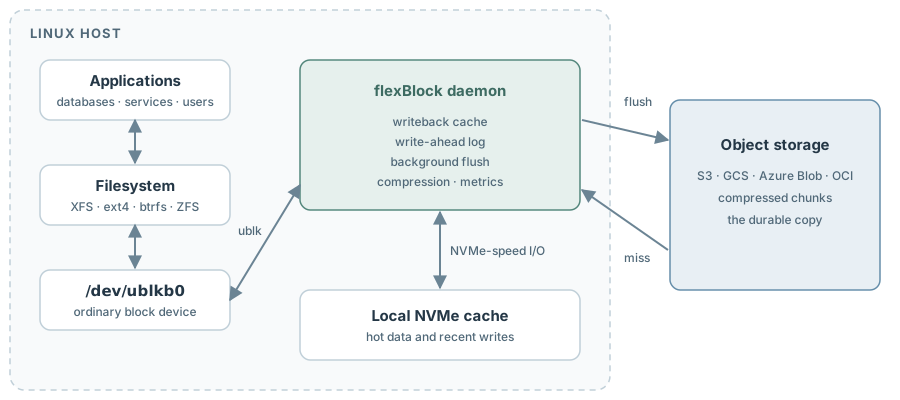
To the Linux kernel, flexBlock is an ordinary block device. Behind it, a small daemon serves every read and write from a local NVMe cache and keeps the durable, compressed copy of the volume in your object storage bucket.
Read the DetailsThree Layers, One Disk
Your applications and filesystem see /dev/ublkb0. The cache makes it fast. The bucket makes it durable.
Reads
From NVMe, or fetched once from the bucket
- Cache hits are served straight from local NVMe
- A miss fetches the chunk from the bucket, decompresses it and keeps it on NVMe
- Sequential cold reads trigger prefetch, so a scan is not paced by one request at a time
- The cache warms on demand; nothing is bulk-copied
Writes
Acknowledged from NVMe, flushed in the background
- Writes are acknowledged from NVMe, at NVMe speed
- A write-ahead log records which data is still waiting for upload
- Dirty chunks are compressed and uploaded in the background
- Chunks the filesystem trims entirely are deleted from the bucket
"Everything on the cache is in the bucket or on its way there."
The cache needs no durability of its own. Losing it abruptly costs the writes not yet flushed, about four minutes' worth by default, and because chunks upload one at a time, the bucket is not a point-in-time copy: expect a filesystem check afterward.
The Volume Lifecycle
One binary covers the whole life of a volume. Every state-changing command can preview itself with --dry-run, and flexBlock refuses rather than guesses when something is not right.
- 1
flexblock initCreate a new, empty volume in the bucket. Choose its size, chunk size and compression.
- 2
flexblock attachSize a cache on a local NVMe device and claim ownership of the volume.
- 3
flexblock startCheck prerequisites, recover if needed and serve /dev/ublkbN until stopped.
- 4
flexblock updateGrow the volume, live on Linux 6.16 or newer, or change compression for new writes.
- 5
flexblock detachRelease ownership. The data stays in the bucket for the next host to attach.
- 6
flexblock wipeDelete the volume and its cache when you are done with it.
Built to Survive the Bad Day
Instances stop, daemons crash and hosts disappear. FlexBlock is designed so the volume itself survives each of them.
Daemon Crash
The kernel holds in-flight I/O while the daemon is away. Run start again, or let systemd do it, and the device resumes with the filesystem still mounted.
Lost Instance
A replacement host takes the volume over and warms its cache on demand. A built-in wait lets the old owner stop writing before the new one starts. Writes not yet flushed are lost, and the filesystem may need a check.
One Writer at a Time
An ownership marker in the bucket, written with conditional writes and renewed as a lease, keeps a second host from claiming a volume in use. A deliberate takeover makes the old host stop, and the new one wait, before it writes.
Capacity That Is Licensed, Not Provisioned
Each volume is covered by a signed license grant from Paradigm4 that names its bucket and its maximum size. Grow the volume whenever you need to, up to that size, live on Linux 6.16 or newer. A renewed grant takes effect within a minute of being installed, or at its start date if that is later.
Talk to us about a licenseSee It on Your Own Hardware
Your First Volume, in the docs, takes you from an empty bucket to a mounted filesystem in four commands.